

2. Projects
2.4 Components and versions of a project
The tools a project needs, the version of each language chosen just for it and how the kit recognizes it from the project's files.
In the app: «Projects»
In short
- The “Components” section says which kit tools the project needs and installs them with one click.
- In “Versions” you choose, for this project only, the version of each language: for example Node 20 here and Node 24 elsewhere.
- A new project keeps the latest versions that were there when it was created, until you change them.
- The choice applies to the project's actions, terminal, agents, editor and web server.
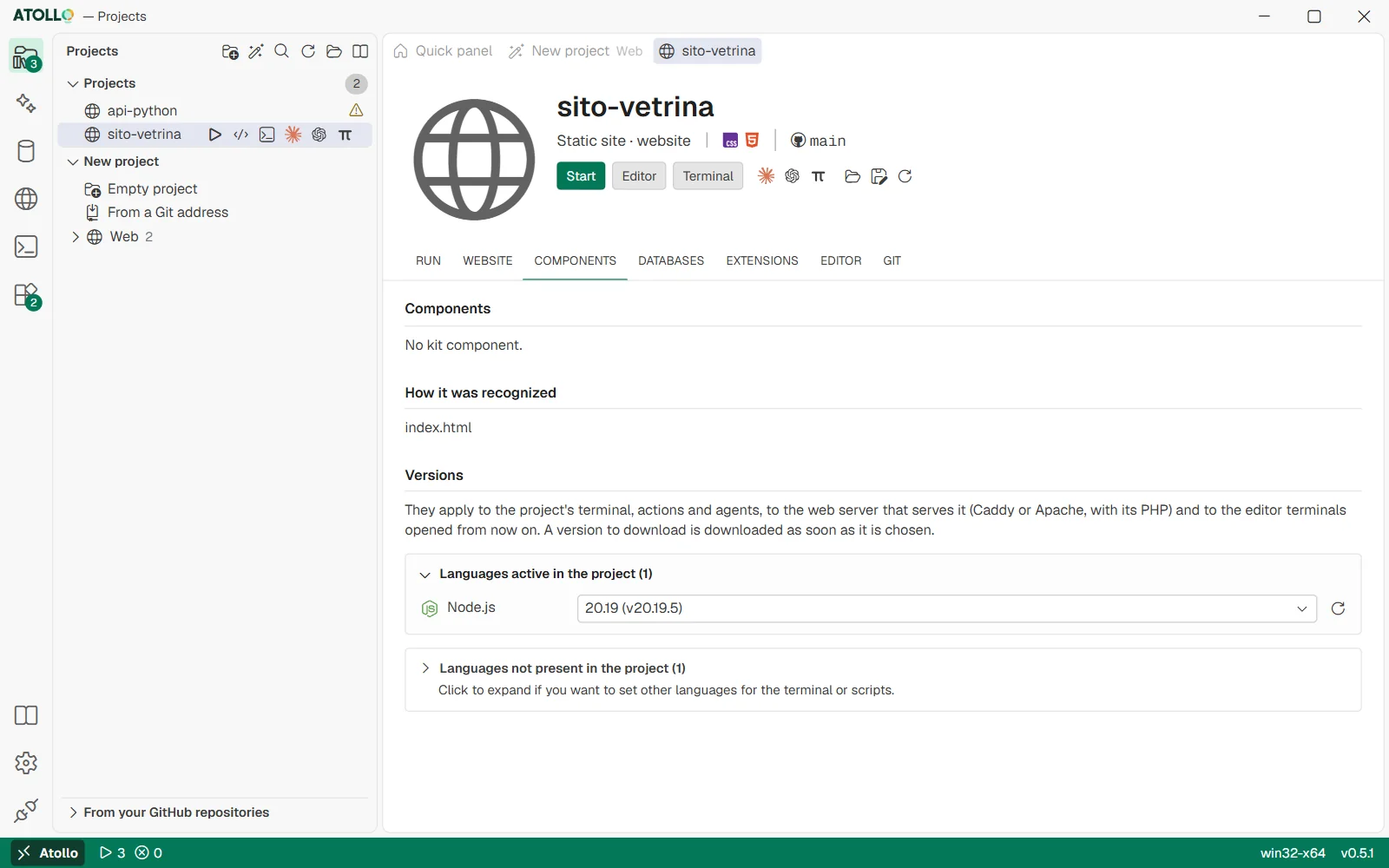
The components the project needs, how it was recognized and the versions of its languages.
Components needed
The “Components” part lists the kit tools the project needs, each “installed” or “to install”. If something is missing, “Install what is missing” installs them and waits for them to finish. The “How it was recognized” part explains from which files the kit worked out the project type, with any warnings (for example “Dependencies not installed: run npm install first”).
Choosing the project's versions
The “Versions” part has two groups: “Languages active in the project”, open, and “Languages not present in the project”, closed, to set other languages to use in the terminal or in scripts.
- Open the menu next to the language.
- The first entry, “The latest (…)”, lets the kit decide: it will always use the newest version on disk.
- Under “Downloaded” are the versions already in the kit; under “To download: 8.x” those the source offers and the kit does not have yet.
- Choose a version: if it is not downloaded, the download starts right away (“Downloading …”). Until it is ready the project uses the newest one (“… is not downloaded: … is used for now”, with “Download” or “Retry”).
- The button with the arrows, “Look for other versions of …”, asks the source again for the list of versions.
Below the menu the kit can show some suggestions: “Required by package.json: >=20” if the project declares a version, or “From the project's containers (Compose or Dockerfile): php 8.3” with the “Use 8.3” button.
Where the starting versions come from
- A project created by the app (empty or with a framework) pins the latest versions present at that moment: a future kit update does not change things under the feet of a project that works.
- A project cloned “From a Git address” uses the versions its code asks for, if the kit recognizes them: .nvmrc, .node-version, .python-version, pyproject.toml, composer.json, .php-version, go.mod, global.json, .ruby-version, pom.xml and others.
- The summary of who asks for what is in the “Relations” view of the Tools page: Overviews: matrix, relations, extensions, requirements (5.3).
Under the hood
- The choice is saved in data\projects\<project>\dev-settings.json, under versions; the first menu entry removes it.
- The kit also writes versions.json and versions.txt in the same folder: the PowerShell and Git Bash profiles read them to put the right versions in the PATH when a terminal opens in that project.
- Besides the PATH, the kit sets JAVA_HOME, DOTNET_ROOT and CP_PHP to the chosen versions.
- The version of the project's database server is chosen in the “Databases” section, not here.