

3. Databases, websites and terminals
3.1 The database servers
The kit's MySQL and MongoDB: starting them, passwords, ports, several versions side by side, phpMyAdmin, mongo-express and the data explorer.
In the app: «Databases»
In short
- The kit has a MySQL server and a MongoDB server, shared by all projects and reachable only from this PC.
- “Start” installs the server if it is missing, turns it on and generates the administrator password.
- Each project then has its own database and its own user, which you create from the project's page.
- You browse and edit MySQL with phpMyAdmin and MongoDB with mongo-express, both in the browser.
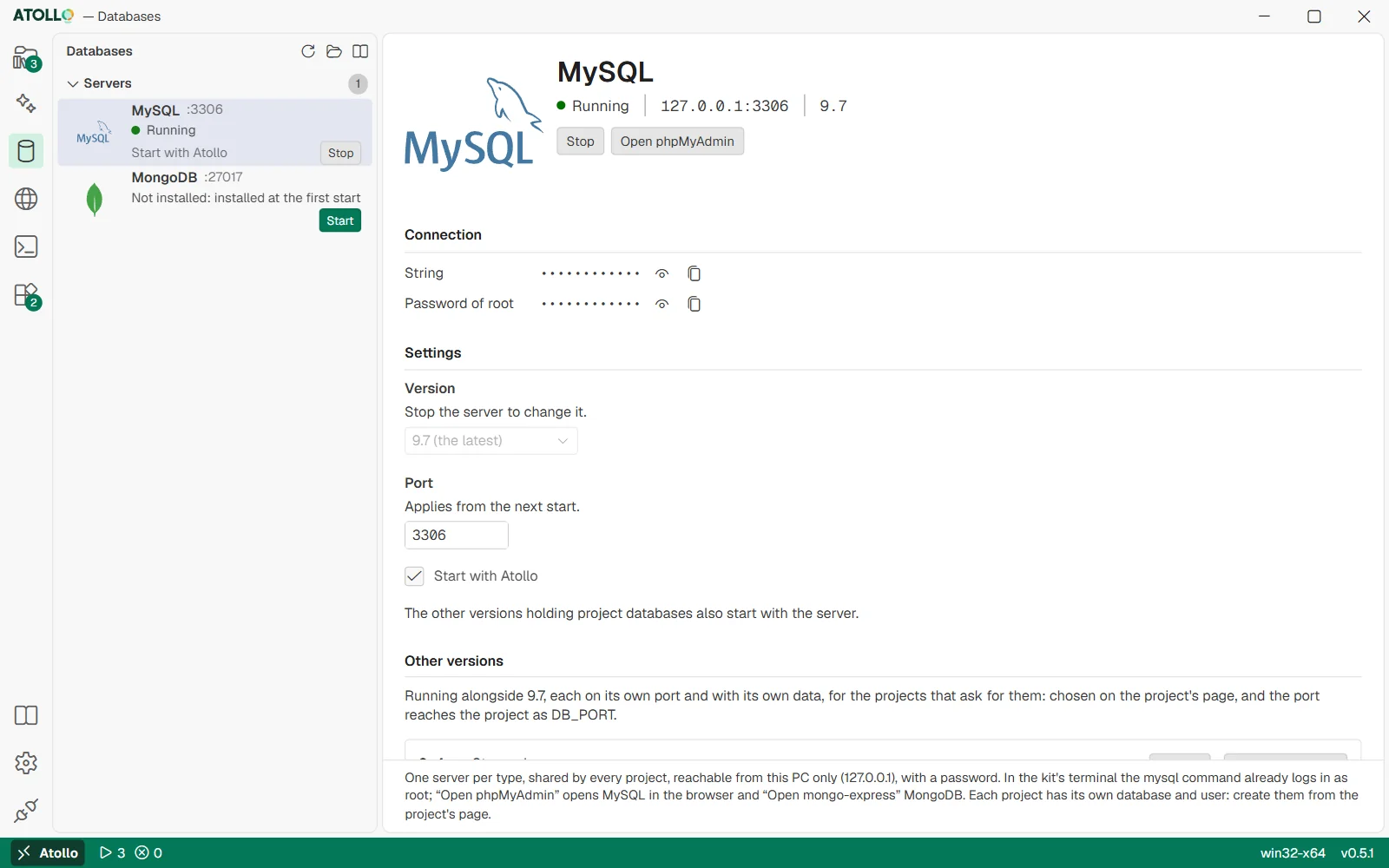
State and address, connection, version, port, “Start with Atollo” and the other installed versions.
The Databases page
In the sidebar, the “Servers” box lists MySQL and MongoDB with their port, status and the “Start” or “Stop” button. Clicking a server opens its page. At the top of the sidebar: “Refresh”, “Open the data folder” (data\db) and the guide's book.
| Status | Meaning |
|---|---|
| Stopped (grey) | The server is off. |
| Starting… (yellow) | The server is starting; the kit waits for it to respond (up to 90 seconds). |
| Running (green) | The server responds on 127.0.0.1 at its port. |
| Error (red) | It did not start: the page shows the last error and the log file. |
| Not installed: installed at the first start | The component is not there yet; “Start” downloads it first. |
A server's page
At the top: the status, the address 127.0.0.1:<port>, the version and the “Start” or “Stop” buttons; for MySQL also “Open phpMyAdmin”, for MongoDB “Open mongo-express”.
| Part | What it contains |
|---|---|
| Connection | “String”: the address to connect as administrator (without the password). “Password of root” (MySQL) or “Password of admin” (MongoDB): hidden, with “Show” and “Copy”. Before the first start: “Generated at the first start.” |
| Settings | “Version” (if you have more than one; you change it while the server is stopped), “Port” (between 1024 and 65535, applies from the next start) and “Start with Atollo” (the server starts by itself when the app opens). |
| Other versions | Appears if you have installed several versions of the same server: each runs on its own port with its own data (see below). |
| Files | “Data”: the data folder of that version. “Log”: the file with the server's output. |
Browsing the data
| Server | How you see the data |
|---|---|
| MySQL | “Open phpMyAdmin”. The first time, the kit installs phpMyAdmin (and PHP if it is missing), turns MySQL on if it is off and opens phpMyAdmin in the browser, already connected as root. For another version there is “phpMyAdmin on …” in the “Other versions” part. |
| MongoDB | “Open mongo-express”. The first time, the kit installs mongo-express (and Node.js if it is missing), turns MongoDB on if it is off and opens mongo-express in the browser, already connected as admin: databases, collections, documents, indexes, import and export. For another version there is “mongo-express on …”. |
Under the hood: phpMyAdmin and mongo-express
phpMyAdmin runs with the kit's built-in PHP server on a random loopback address (127.x.y.z, not 127.0.0.1) and on a port chosen by the system, with a new token at every start: without the token it responds 403. Only one is open at a time; it stops with the MySQL version it is connected to or with the app. Its language is Atollo's.
mongo-express is a build of Atollo's: compiled in CI from mongo-express's code at a pinned commit, published in Atollo's releases and checked with its SHA-256 before it is installed. It runs with the kit's Node.js, the same way as phpMyAdmin: a loopback address of its own, a port no other part of Atollo uses, a new token at every start, 403 without it. MongoDB's admin password reaches it only in its environment, never on the command line or in the browser. mongo-express's interface is in English.
Several versions of the same server
You can install several versions of MySQL or MongoDB (from the Tools page). The server uses the one chosen in “Version”, usually the newest. The others appear in the “Other versions” part: each has its own port (3307, 3308… for MySQL, assigned at the first start) and its own data folder, and starts together with the main server if a project uses it.
- At the first start of a newer version, the kit copies the data of the previous one, which stays as it was: you can go back.
- A project chooses the server version in its “Databases” section; it receives the port as DB_PORT.
- Each version keeps its own port: changing the server's “Version” moves no port, and the projects' connections stay right.
- A port that another version, a web server pool or a project action already has, or one between 7000 and 7099 (the editor's), is refused: the message says whose it is.
- Two starts of the same version at once (from the page and from a project, for example) turn on a single server, on the same port.
Under the hood
| What | Where |
|---|---|
| Data of each version | data\db\mysql\8.4 · data\db\mongodb\8.0 |
| Ports, automatic start, chosen version | data\app\services.json |
| root and admin passwords | data\app\db\secrets.json |
| mysql login in the console | data\app\db\mysql.cnf |
| Logs | data\app\logs\mysql.log · mongodb.log |
The data\app\db folder can be read only by your user on NTFS drives. MySQL uses a my.cnf file written by the kit at every start (only 127.0.0.1, no binary log, lowercase table names); MongoDB always starts with authentication. The mysql command in the console logs in as root only on the main version.