

3. Databases, websites and terminals
3.2 A project's database
A database and a user just for the project, the connection written in the .env file, backups and restoring.
In the app: «Projects»
In short
- Each project has a database and a user all its own, with a password generated by the kit.
- “Write to .env” puts the connection in the project's .env file, after showing you what changes.
- “Copy .env block” copies the same lines, to paste wherever you want.
- “Export” saves a copy of the database; “Restore…” puts it back.
- Everything is done from Projects › the project › “Databases” section.
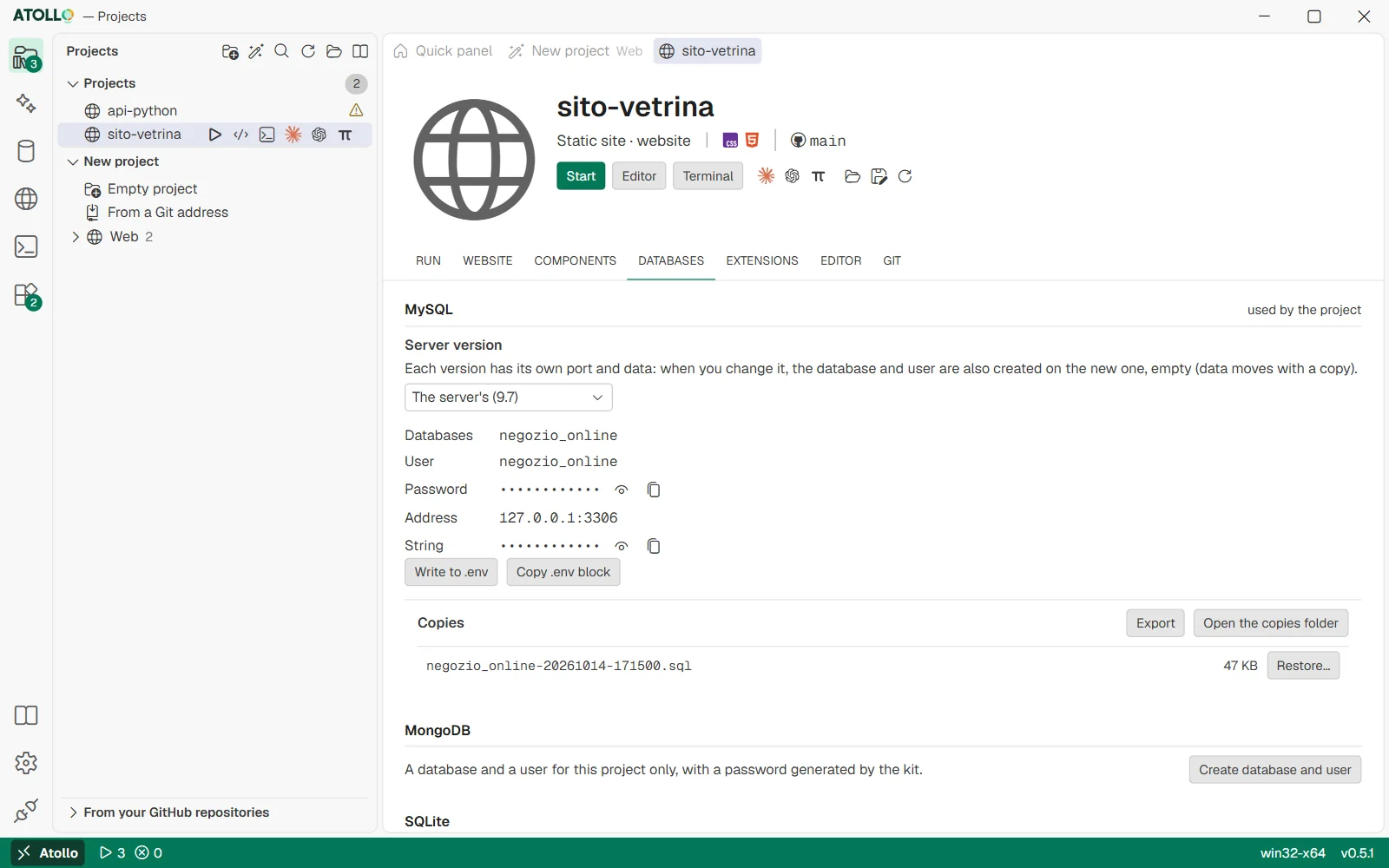
The project's database, user, password and address, “Write to .env” and the copies, with “Export” and “Restore…”.
Creating the database and user
The section has one part for MySQL and one for MongoDB (with “used by the project” if the kit sees that the project uses it). If the project uses SQLite, a note explains that the database is a file of the project and no server is needed.
- Press “Create database and user” in the part of the server you need.
- The kit installs and starts the server if needed, then creates a database and a user with the project's name (lowercase letters, digits and underscore: gestionale-fatture becomes gestionale_fatture) and a 32-character password.
- The part shows “Database”, “User”, “Password” and “String” (hidden, with “Show” and “Copy”) and “Address”.
Writing the connection to the .env file
- Press “Write to .env”.
- “Lines of .env that change” appears: for each key, the old value crossed out and the new one (passwords hidden).
- Press “Write” to confirm, or “Cancel”.
The kit chooses the keys based on your .env file:
| If the .env… | MySQL writes | MongoDB writes |
|---|---|---|
| already contains DB_CONNECTION= (Laravel style) | DB_CONNECTION, DB_HOST, DB_PORT, DB_DATABASE, DB_USERNAME, DB_PASSWORD | DB_CONNECTION=mongodb, DB_DATABASE, MONGODB_URI |
| does not contain it | DATABASE_URL | MONGODB_URI |
.envDB_CONNECTION=mysql
DB_HOST=127.0.0.1
DB_PORT=3306
DB_DATABASE=gestionale
DB_USERNAME=gestionale
DB_PASSWORD=3f9c…(32 characters generated by the kit).envDATABASE_URL=mysql://portale:3f9c…@127.0.0.1:3306/portale
MONGODB_URI=mongodb://portale:a71e…@127.0.0.1:27017/portale?authSource=portale- If the .env file does not exist, it is created by copying .env.example. The other lines and the comments stay.
- If the connection is already the right one: “The .env file already has this connection.”
- “Copy .env block”, next to it, does not touch the file: it copies the lines of the table (DB_* for Laravel, otherwise DATABASE_URL or MONGODB_URI) to paste into another .env, a configuration file or a terminal; “Copied” appears. The lines contain the password: the kit reads them only when you press the button.
Copies and restore
- In the “Copies” part press “Export”: “Copy saved: …” appears and the copy is added to the list.
- To go back to a copy, press “Restore…” next to the file and confirm: “The current data is replaced.”
- Before restoring, the kit copies what the database holds now, into <database>-prima-del-ripristino-<date and time>: if the copy fails, the restore is not done. So a restore of the wrong file is undone by restoring that copy.
- “Open the copies folder” opens the folder: to restore a copy that came from outside (from a colleague, from another kit), put it there and it will appear in the list.
Of the safety copies (“prima-del-ripristino” and “prima-del-cambio-di-versione”) the kit keeps the last 3 of each kind and deletes the older ones. The copies made with “Export” are never deleted.
Changing the server version
If you have several versions of MySQL or MongoDB, the “Server version” menu chooses which one the project's database runs on. When you change it, the database and user are also created on the new version, empty: you carry the data over with a copy (Export on the old one, Restore on the new one). If the chosen version is not installed, “Install …” appears. Before the change the kit copies the database on the version it leaves, into <database>-prima-del-cambio-di-versione-<date and time>: if the copy fails, the version does not change (if that version is no longer installed, there is nothing to copy and the change goes ahead).
Under the hood
- Names, passwords and versions of the project's database: data\projects\<project>\private\db.json, readable only by your user on NTFS.
- MySQL: user with caching_sha2_password on localhost and 127.0.0.1, all privileges on the project's database only. MongoDB: dbOwner role on the database, authSource equal to the database name.
- MySQL copies are .sql files made with mysqldump (--single-transaction, with routines, triggers and events); MongoDB copies are .archive.gz files made with mongodump. The MySQL restore runs with the project's user and without client commands; the MongoDB one touches only the project's database.
- MySQL safety copies use mysqldump --force: a broken object (a view on a dropped table) does not stop the copy of the rest. Before a MySQL restore the administrator drops the views, triggers, routines and events of the project's database only (the project's user could not replace those of root); the copy creates them again as the project's user.
- When you delete the project from the app, the kit also deletes the database and user on every version where it had created them.